Legacy Modernization
Every organization eventually reaches the same point. An old system that has run the business for fifteen years starts to feel heavy. It’s hard to change, the people who built it have moved on, and the screens look like they belong in a museum. The decision is made: let’s modernize.
What usually follows is a race to build something new and better-looking. New screens get designed, new technology gets chosen, and a launch date appears on the calendar.
Somewhere in that excitement, the most important question gets lost:
Does the new system still do everything the old one did?
Modernization is not only a technology project. It is a promise to the people who depend on the system: staff, customers, auditors. The promise is that nothing they rely on will quietly disappear. Here is what I’ve learned about designing modernization so that promise is kept.
1. Start by understanding, not by designing
The instinct is to open a design tool and start sketching the future. Resist it.
The old system is the most accurate description of how your business actually runs. It holds years of decisions, exceptions, workarounds, and rules that were never written down anywhere else. Documentation drifts over time, and people remember what they use often and forget the rest. The system itself has been doing the work all along.
So the first phase of any modernization should be discovery: walking through the old system carefully and recording what it actually does, before deciding what the new one should do.
Take a card management system in a bank. Staff search for customers, look up their cards, activate new cards, block lost ones, and issue replacements. It sounds simple, but behind each action sit rules like these:
- A blocked card cannot be activated.
- An expired card cannot be activated.
- Only an active card can be blocked.
Nobody thinks about these rules day to day because the old system enforces them silently. Rebuild without discovering them first, and they are exactly what goes missing.
2. Look at what people do, not just what the screens show
Screens show what is possible. Usage shows what matters.
In our card system example, the usage history told a clear story:
| Activity | How often it happened |
|---|---|
| Searching for cards | 1,250,000 times |
| Viewing a card | 980,000 times |
| Blocking a card | 72,000 times |
| Activating a card | 55,000 times |
| Replacing a card | 21,000 times |
| Changing a limit | 9,000 times |
| Exporting a card report | 17 times |
That table should shape the whole modernization plan. Search and viewing are the daily backbone, so they must be fast and flawless. Blocking a card happens less often, but it is usually urgent: a customer on the phone, a card just stolen. It deserves careful design and testing.
The report exported 17 times raises an honest business question: should it be rebuilt at all?
A well-designed modernization uses real usage to decide where to invest effort. It doesn’t treat every legacy feature as equally important.
3. Be honest about what you don’t know
This is where most modernization programs go wrong, and it is rarely discussed.
When we explored the old card system, the usage data proved that staff block, activate, and replace cards tens of thousands of times. Our exploration never reached the screens where that happens: the customer page was still loading when we looked.
That gap is normal. The dangerous part is what teams often do next. They fill the gap with assumptions: “It probably works like this.” The assumption turns into a requirement, the requirement gets built, and nobody checks it against reality.
A good modernization design treats unknowns as first-class information. Every finding should carry an honest label: we saw this directly, the evidence strongly suggests this, or this is a reasonable guess. Alongside those findings sits an explicit list of what hasn’t been confirmed yet.
This may feel uncomfortable, because it exposes gaps. But a gap you can see can be fixed. A gap hidden behind confident assumptions surfaces at go-live, in front of customers.
4. Separate the “what” from the “how”
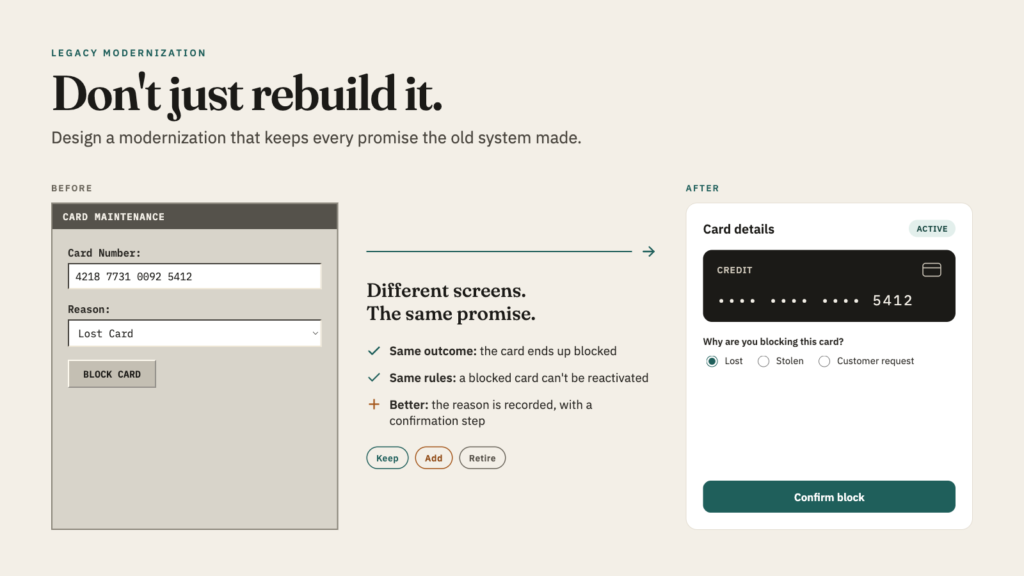
Legacy screens are often ugly. Blocking a card in an old system might mean typing a card number, choosing “Lost Card” from a dropdown, and pressing a button. In a modern system, the same task might mean opening a card tile, tapping “Block Card”, choosing Lost, Stolen, or Customer request, and confirming.
The two experiences look nothing alike, yet they do the same job. The card ends up blocked. A blocked card still can’t be reactivated.
That is the core design principle of modernization: preserve the business outcome, and feel free to change the experience. The screens, buttons, technology, and navigation can all change. What the business achieves, and the rules it must follow, cannot.
When you design with this in mind, you stop asking “does the new screen look like the old one?” You start asking “does the new screen achieve the same outcome, under the same rules?” That is a far better question.
5. Sort every feature into three honest buckets
Once you understand the old system and have a vision for the new one, every feature belongs in one of three buckets.
Keep: what must survive. These are capabilities the business depends on, such as searching for a customer by ID or name, opening their details, and every card action the usage data proves exists. They may look different, but they must still work.
Add: what the old system never had. These include working on phones and tablets, a clear message when a search finds nothing, a proper explanation when something fails, an “Are you sure?” before blocking a card, confirmation when an action succeeds, and full keyboard accessibility. These are the reasons the modernization is worth funding.
Retire: what we deliberately leave behind. This covers duplicate addresses for the same screen, outdated page structures, bare “Loading…” text, and the silent failures where the old system simply showed nothing. Retiring something should be an explicit decision, never an accident.
The third bucket is the one teams forget. Features disappear during modernization all the time, but usually by oversight rather than by choice. Naming what you’re retiring, and why, turns an accidental loss into a business decision.
6. Design for proof, not for hope
The biggest shift in mindset is this: a modernized system should be designed so you can prove it’s equivalent, not just believe it.
For every important business capability, you should be able to trace a line from the business need, through the old screen and the old data, to the new screen and the new data, and show that the outcome and the rules are the same. When a rule exists in the old system and can’t be found in the new one, that should be flagged immediately as a potential regression. It should not be discovered later by a customer.
That kind of proof reduces go-live risk and gives auditors and regulators a clear trail. It also gives business owners something rare in large technology projects: confidence based on evidence rather than reassurance.
The takeaway
A modernization program succeeds when it keeps its promise:
- It understands the old system before redesigning it.
- It uses real usage to decide what matters most.
- It is honest about gaps instead of hiding them behind assumptions.
- It preserves business outcomes while freely improving the experience.
- It decides deliberately what to keep, what to add, and what to retire.
- It can prove all of the above.
A modern look is easy to deliver. Keeping every commitment the old system made quietly for fifteen years, and showing that you kept them, is what makes the modernization succeed.